How do I know my website has been hacked?
Hackers often hide their pages from the site owner. If Google shows strange results for your domain, believe Google, not what you see on the homepage.
- Google shows pages you never made, often in another language or about medicines, betting or fake shops. Search
site:yourdomain.comto see them. - Visitors from Google or mobile are redirected to another site, while it looks normal when you type the address directly.
- Google Search Console shows a Security issues or Manual actions message, or a warning screen appears in the browser.
- Your hosting provider suspends the account or reports high load or malware.
- New admin users, unknown files in your website folders, or new scheduled tasks (cron jobs) appear.
- Your emails suddenly bounce or go to spam because the server was used to send spam.
What should I do in the first hour?
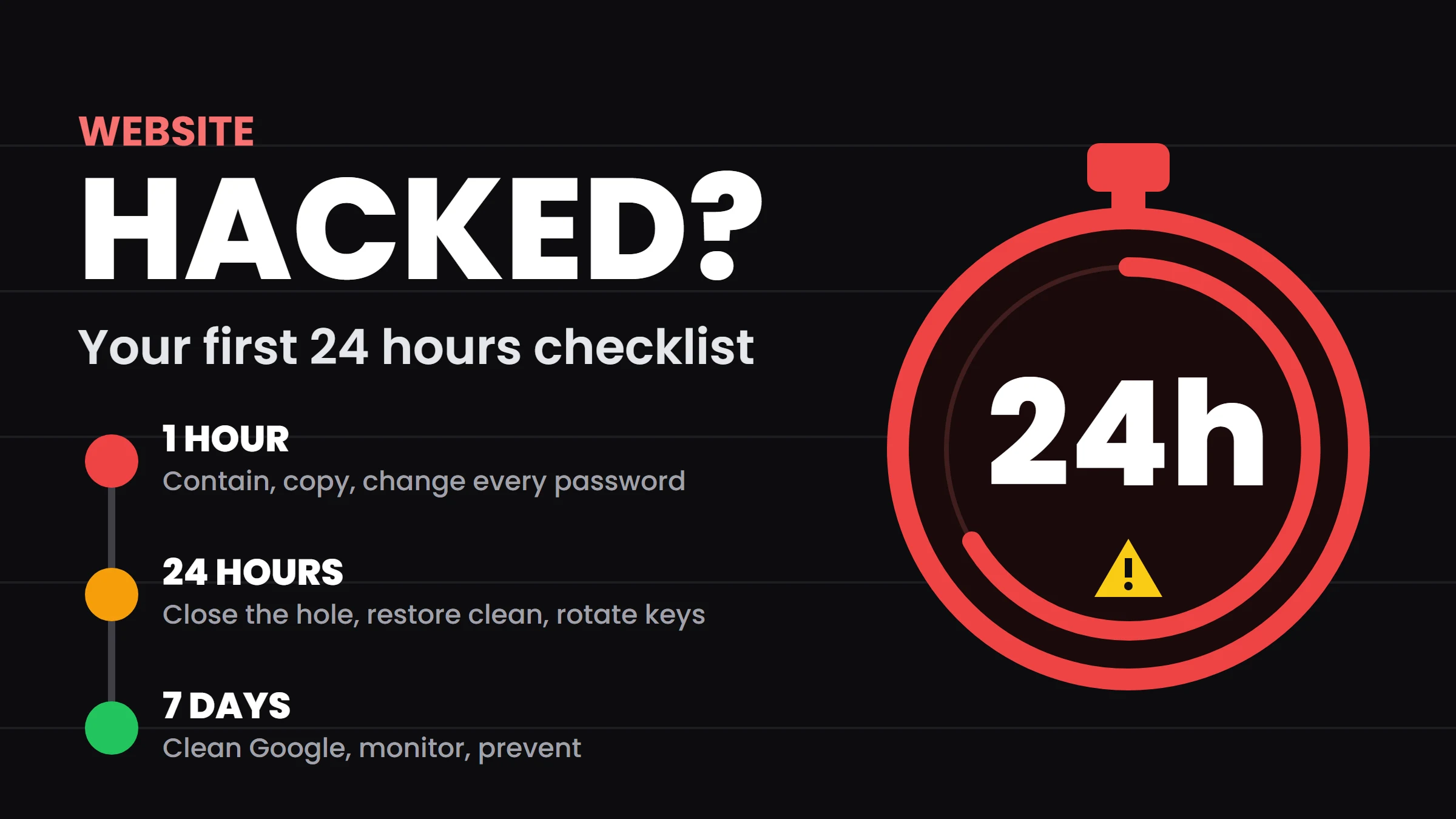
- Stay calm and write things down: what you saw, when, and screenshots. You will need this for your host and for Google.
- Contain it: if visitors are being redirected or infected, put the site in maintenance mode or ask your host to restrict access while you work.
- Take a full copy of the hacked site (files and database) and keep it offline. It is evidence, and it shows how the attacker got in. Do not restore over it yet.
- Change every password from a clean computer: hosting control panel, FTP and SSH, database users, website admin users, domain registrar, DNS provider, and email accounts. Turn on two-factor login wherever you can.
- Check Search Console users and owners under Settings. Attackers sometimes verify themselves as owners to submit their spam sitemaps. Remove anyone you do not know and delete their verification files or tags.
- Tell your hosting provider. They can check server logs, other accounts and malware scans you cannot see.
What should I do in the first 24 hours?
- Find the entry point: an outdated plugin, theme or script, a weak or reused password, a leaked FTP login, or an upload form that accepts scripts. If you do not close the door, they come back.
- Look for what was added: recently changed files, unknown PHP files in upload or image folders, changed
.htaccessorindex.phpfiles, new admin users, new database entries with spam links, and new cron jobs. - Restore clean files from a backup taken before the hack, or reinstall the core software, plugins and themes from official sources. Then copy back only your own content and uploads after checking them.
- Update everything: core software, plugins, themes, PHP version and server software. Remove plugins and themes you do not use.
- Rotate secrets: database passwords in config files, API keys, payment gateway keys, OAuth client secrets, form protection keys and any app keys. Anything stored on the hacked server should be treated as leaked.
- Scan again with your host's malware scanner and check the site from Google's view (URL Inspection in Search Console) to confirm the spam is gone.
How do I remove hacked spam pages from Google?
After cleaning, the spam URLs must stop working. Make sure they return a 404 (not found) or 410 (gone) status, not your homepage and not a redirect. A 410 tells Google clearly that the pages were removed on purpose, and they usually drop out of results faster.
- Check a few spam URLs in URL Inspection to confirm Google now sees 404 or 410.
- Remove any spam sitemap the attacker submitted in Search Console, and submit your own clean sitemap.
- For urgent cases, use the Removals tool in Search Console to hide a whole spam folder temporarily while Google recrawls.
- If Search Console shows a Security issues report, fix everything listed, then click Request review and explain what you cleaned and how you closed the entry point.
- Check Bing Webmaster Tools too: see our Bing Webmaster Tools setup guide.
What should I do in the first week after a hack?
| When | Task | Why |
|---|---|---|
| Daily | Check Search Console coverage, security issues and new users | Spot new spam pages or a re-infection early |
| Daily | Search site:yourdomain.com for spam titles | Confirm spam is dropping out of Google |
| Day 2 to 3 | Check email deliverability and blacklists | Hacked servers are often used to send spam |
| Day 3 | Confirm backups run and are stored off the server | A clean, recent backup is your fastest recovery |
| Day 5 to 7 | Review server and access logs for repeat attempts | See if the same attacker keeps trying |
| Week end | Remove old unused accounts, plugins, test folders and zip files | Old leftovers are a common way back in |
How can I prevent my website from being hacked again?
In real cleanups, three steps save the most time: an offline copy of the hacked site, rotating every secret, and checking Search Console owners. Skipping any of them is the most common reason a site gets hacked again.
- Updates every month for core, plugins, themes, PHP, Node.js and frameworks such as Next.js, and the same day when a critical fix is announced. Or a maintenance plan that does it for you.
- Unique strong passwords and two-factor login on the hosting panel, registrar, website admin and email.
- Daily backups stored off the server, with a tested restore.
- Least access: separate logins for each person, removed when they leave. No shared FTP passwords in chats.
- Secrets outside the web folder wherever possible, and never left in public zip or backup files.
- Firewall rules and monitoring from a good hosting provider, plus alerts from Search Console.
- HTTPS everywhere: see what an SSL certificate does.
Why have so many websites been hacked in the last few months?
Many recent hacks did not start with a weak password or an old plugin. They started with critical flaws in the software that runs the website itself: the PHP language, and the Next.js and Node.js platforms used by many modern sites. Attackers scan the whole internet for unpatched servers within hours of a fix being published.
| When | Platform | What happened | Fixed in |
|---|---|---|---|
| October 2026 | PHP | Two critical flaws, nicknamed "PHP2Shell" (CVE-2026-109618 and CVE-2026-109619), can allow remote code execution without a login. Researchers reported mass scanning within hours of disclosure, and CISA added both to its known exploited list on 26 October. | PHP 8.5.12, 8.4.27, 8.3.36 and 8.2.35 |
| October 2026 | Next.js | Two critical remote code execution fixes released on 14 October, including CVE-2026-96889 in image optimization. One fix had no CVE ID at release, so dependency scanners may not flag it. | Next.js 16.4.1 and 15.5.28 |
| October 2026 | Node.js | A critical flaw in the built-in Brotli decoder (CVE-2026-111497). | Node.js 22.23.4, 24.22.1 and 26.12.1 |
| August 2026 | Next.js | A path traversal flaw (CVE-2026-75604) that can lead to remote code execution on servers using a Windows file system. | Next.js 15.5.24 and 16.3.3 |
What should I do about these PHP, Next.js and Node.js flaws?
- Ask your host which PHP version your site runs, and whether the server is on the patched release. Updating WordPress or plugins does not update PHP itself.
- For Next.js and Node.js apps, upgrade the framework and the Node.js runtime, rebuild and redeploy. Do not rely only on an audit tool saying "0 vulnerabilities".
- If your site ran an unpatched version during an attack wave, treat it as possibly compromised: follow the 24 hour checklist above and rotate every secret, even if the site looks normal.
FAQ
Conclusion
A hack feels like an emergency, but the order of the steps matters more than speed. Contain it, keep an offline copy, change every password, find and close the entry point, restore clean files, rotate secrets, clean up Google, and watch closely for a week. Then put updates, backups and two-factor login on a schedule so it does not happen again.