First, be clear which page isn't indexed
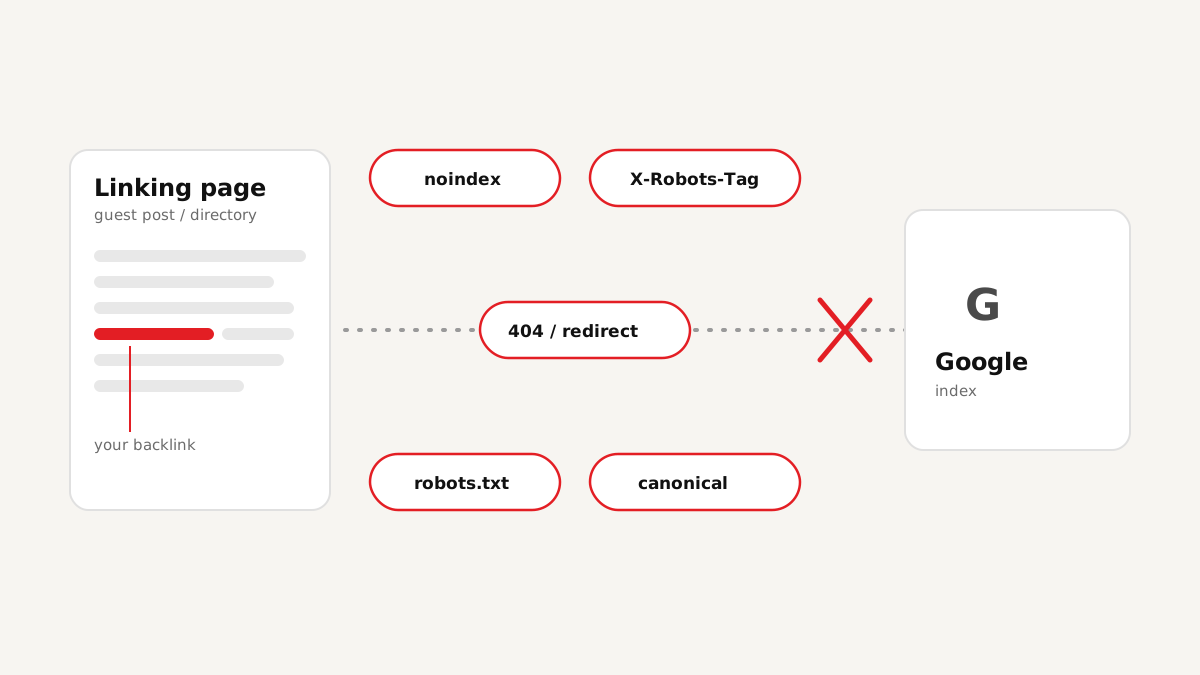
When people say "my backlinks aren't indexed", they usually mean the linking page, the guest post or directory listing that contains the link, doesn't show up in Google. That matters because Google discovers and weighs links by crawling and indexing the pages they sit on. If that page is excluded, the link on it is effectively invisible.
So the diagnosis is about the other website, not yours. The good news is that most of the reasons are technical, visible in the page's code or headers, and easy to confirm once you know where to look.
Blocker 1: a noindex meta tag
The most direct blocker is a robots meta tag in the page's <head>, such as <meta name="robots" content="noindex">. It tells search engines not to include the page in their index. It's common on tag and archive pages, "thin" directory profiles, staging copies, and sites where a WordPress setting like "Discourage search engines" was left switched on.
You can spot it with View source and a search for "noindex". It may also target Google specifically, as name="googlebot".
Blocker 2: an X-Robots-Tag header
The same instruction can be sent in the HTTP response headers instead of the HTML: X-Robots-Tag: noindex. This one is easy to miss, because it doesn't appear anywhere in the page source. You only see it in the browser's network panel or with a tool that reads response headers. Server-level rules, CDNs and some security plugins add it, sometimes to whole sections of a site.
Blocker 3: a robots.txt disallow rule
A Disallow rule in the site's /robots.txt stops Googlebot from crawling matching URLs. Strictly speaking, robots.txt controls crawling rather than indexing, so a blocked URL can occasionally still appear in results as a bare link. But Google can't read the page's content, which means it can't see your link on it either.
Directories and forums sometimes block their listing or profile paths this way. Checking means reading the robots.txt file and matching the linking page's path against its rules, including wildcards.
Blocker 4: a canonical pointing somewhere else
A canonical tag (<link rel="canonical" href="…">) tells Google which URL is the "main" version of a page. If the page with your link declares a different URL as canonical, Google will usually index that other URL instead. If your link doesn't exist on the canonical version (common with paginated, filtered or printer-friendly pages), Google may never see it.
Blocker 5: error statuses and redirect chains
A page that returns 404, 410 or a 5xx server error can't be indexed. A page that redirects, especially through several hops, gets indexed (if at all) at its final destination, which may not contain your link. Soft errors count too: a page that loads with status 200 but shows "listing not found" is often treated as a soft 404.
When there's no blocker at all
Sometimes a linking page passes every technical check and still isn't indexed. Google doesn't index everything it crawls. Pages with thin or duplicated content, sites full of near-identical guest posts, and link pages with little else on them are often crawled and left out. Search Console calls this "Crawled – currently not indexed".
No setting fixes that, and no indexing service can guarantee to override it. The realistic fix is upstream: earn links on pages with genuine content, on sites Google already indexes well.
Key takeaway: technical blockers (noindex, X-Robots-Tag, robots.txt, canonical, errors) can be found and often fixed. Quality-based exclusion can't be forced. Google decides.
A quick reference of the blockers
| Blocker | Where it lives | How to spot it |
|---|---|---|
| noindex meta | Page HTML <head> | View source, search "noindex" |
| X-Robots-Tag | HTTP response header | Network panel or a header-reading tool |
| robots.txt disallow | /robots.txt on the linking site | Match the page path against Disallow rules |
| Canonical elsewhere | Page HTML <head> | Compare the canonical URL with the page URL |
| Errors and redirects | HTTP status | Status code and redirect hops |
| Quality exclusion | Google's own decision | Search Console, or a site: search over time |
How to check every linking page at once
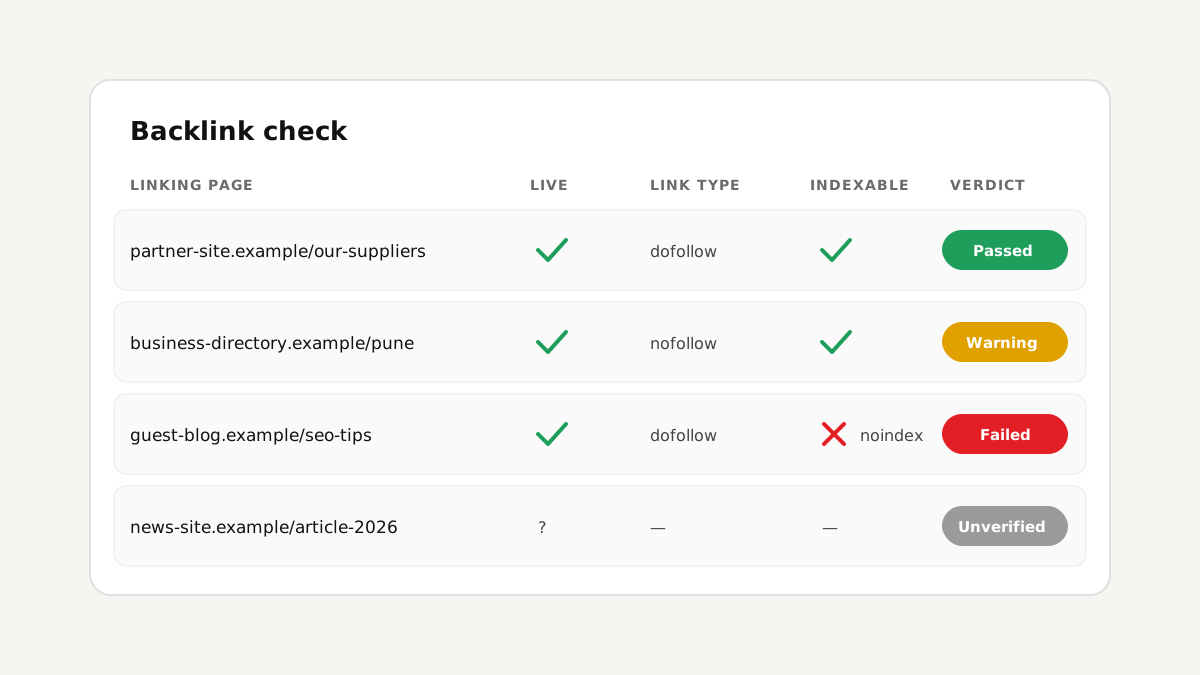
Checking five headers and files per link by hand gets slow fast. WEB HOST PUNE Tools reads all of them in a single scan: paste your linking pages and check your backlinks for noindex, X-Robots-Tag, robots.txt, canonical, HTTP status and redirects, alongside whether the link is still live and what type it is. Each link gets a Passed, Warning, Failed or Unverified verdict, so the blocked pages stand out straight away.
If you're new to backlink checks, start with our step-by-step guide on how to check your backlinks.
Does submitting links for indexing help?
Requesting indexing can help Google discover a page sooner, but it can't override a noindex tag, a robots.txt block or a quality decision. That's why the order matters: check first, fix or drop the blocked links, then submit only the pages that are actually indexable. On the Pro plan, WEB HOST PUNE Tools adds a Google index check and the WEB HOST PUNE Indexer for submitting links. Even then, whether and when a page is indexed is up to Google.
FAQ
Conclusion
When backlinks don't get indexed, the cause usually sits on the linking page: a noindex tag, a header you can't see in the source, a robots.txt rule, a canonical pointing elsewhere, or an error. Those can all be checked, and many can be fixed by asking the site owner. What can't be forced is Google's judgment about thin pages, which is why the most reliable fix is still earning links on pages worth indexing in the first place.