In depth: Web Hosting
What "hosting" is actually paying for
A website has to live on a physical server somewhere, running 24 hours a day, reachable from anywhere. Hosting is what makes that possible — and how that server's resources get divided up between you and every other site sharing it is the real difference between the hosting types you're choosing between, more than any marketing label on a pricing page.
Most confusion around "which hosting do I need" comes from treating it as a brand decision rather than a resource-allocation decision. Once you understand how the resources are actually split, the right choice usually becomes obvious.
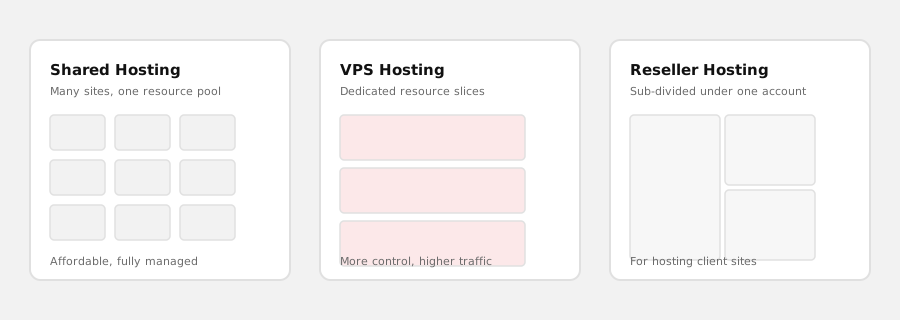
The honest version of "which one do I need"
Shared hosting puts many websites on one server, splitting its resources across all of them. It's affordable specifically because the cost is shared, and for a standard business website with typical traffic, it's genuinely enough — most sites never come close to needing more than shared hosting provides.
VPS hosting gives your site a dedicated slice of a server's resources, walled off from other sites. It costs more because you're not splitting capacity with strangers, and it makes sense when a site has outgrown shared hosting's limits — noticeably slow performance under normal traffic, or a specific server configuration need shared hosting can't accommodate.
Reseller hosting is a different question entirely — it's not "more power for one site," it's a way to host multiple separate client sites under one account, sub-divided so each client's site is isolated from the others. It's built for agencies and freelancers managing several client websites, not for a single business hosting its own site.
If you're asking "which plan makes my one site faster," the honest answer is almost always shared or VPS, not reseller — reseller solves a different problem.
Why "managed by the people who can also build your site" actually matters
A lot of hosting providers are purely infrastructure — you get server space and you're on your own for everything else. We host and build websites, which changes what happens when something goes wrong: a slow site, a broken plugin update, an expired SSL certificate. We can see and fix the actual cause, rather than telling you it's a "website issue, not a hosting issue" and leaving you to find someone else to solve it. See our support & maintenance page for how that ongoing relationship works.
How server management has changed, and what a hosting environment now needs to support
Hosting has traditionally meant a server running your site, monitored reactively — someone notices a problem, someone fixes it. Two things have genuinely changed recently: how monitoring and maintenance work, and what kind of applications a modern hosting environment increasingly needs to support.
| The classic way | The AI-enhanced way |
|---|---|
| Uptime and performance issues get noticed after they've already caused a problem | AI-assisted monitoring tools can flag unusual patterns earlier, before they become visible outages |
| Server maintenance is reactive — something breaks, then it gets fixed | Maintenance can move toward being proactive rather than purely reactive |
| A hosted site is a passive resource — a browser requests it, the server serves it | A hosted application can be structured to be queried and acted on by AI tools, not just browsed by people |
On the operations side, modern server monitoring increasingly uses AI-assisted anomaly detection to catch unusual patterns — a slow memory leak, an abnormal traffic spike — earlier than a purely manual monitoring routine would, which is part of what "managed hosting" means in practice today, not just uptime checks on a fixed schedule.
On the application side: if you're hosting a custom application built with an MCP (Model Context Protocol) interface — see our Custom Software page for what that means — the hosting environment needs to reliably support that kind of ongoing, structured access, not just serve static pages to a browser. This is a genuinely new consideration for hosting a modern application, worth planning for from the start if it's relevant to your project, rather than treating hosting purely as commodity server space.